Quick answer
To identify an industrial connector without a part number, check the marking engraved on the housing, the manufacturer, the current rating, the cable cross-section, the type of connector (male or female, in-line or panel-mount), and its color. With that information, or with a good photo, the exact part number or a compatible alternative can be found.
It is a common situation: a connector fails in the middle of a job, the part number has worn off with use, or the equipment was bought by someone who is no longer around. Searching Google for “power connector” won’t tell you which one is yours. Knowing what to look for will.
If you are going to handle the connector or the cable to inspect it, always do so with the installation de-energized. Connecting, disconnecting, and handling power connectors is a job for a qualified electrician.
You don’t need all of it. The more you gather, the faster and more reliable the identification will be.
- Part number or marking — The code engraved or printed on the housing. It is the most direct piece of information, even if it is partially worn off.
- Manufacturer — The brand usually appears next to the part number. It helps you work out which connection standard the connector belongs to.
- Current rating (A) — Many connectors have the rated current marked on them. For example, the Phase3 PowerSafe range includes models of up to 500 A for 120 mm² cable and up to 800 A for 240 mm² cable.
- Cable cross-section (mm²) — This determines which contact the connector needs. It is usually printed on the cable’s sheath.
- Connector type — Male or female (plug or receptacle), and in-line (at the end of the cable) or panel-mount (fitted to a panel or to a piece of equipment).
- Color — On single-pole power connectors, the color indicates the function: earth, neutral, or phase.
- Application — Where it is used: generator, distribution board, lighting, event, construction site…
- Datasheet or drawing — If you have documentation for the equipment or the installation, it can provide details that can’t be seen at a glance.
Where to find the part number
WHERE TO LOOK
WHAT YOU CAN FIND
Connector housing
Engraved part number, manufacturer, and current rating
Cable sheath
Cross-section in mm² and cable type
Original packaging or labels
Full manufacturer part number
Previous invoices or orders
Part number and supplier from the last purchase
Equipment manual or datasheet (generator, switchboard)
Type of panel-mount connector and its current rating
If the marking is partially worn off, write down whatever can be read, even if it is only a few characters. Combined with the rest of the information, it is usually enough.
Visual clues that help identify it
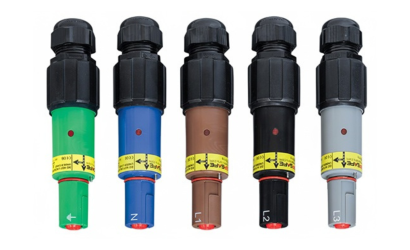
Color indicates function. On single-pole power connectors such as Phase3 PowerSafe, each function has its own color: earth (green), neutral (blue), and the three phases (brown, black, and gray). If you are only missing one connector from a set, the color tells you which one it is.
Mechanical keying prevents mistakes. These connectors are mechanically keyed so that one cannot be connected in a position that does not correspond to it. That is why it is important to identify the exact function of the connector you need, not just its current rating.
The shape tells you the type. An in-line connector goes on the end of a cable; a panel-mount one is fixed to a panel, a switchboard, or a piece of equipment. And male and female, the one that supplies power and the one that receives it, are not interchangeable either.
How to take a useful photo of the connector
A good photo saves a lot of questions. We recommend sending:
- A front view — The mating face, where the contacts can be seen.
- A full side view — Of the whole connector, with the cable gland and the start of the cable.
- A close-up of the marking — Well lit and in focus, even if it is half worn off.
- The cable sheath — The area where the cross-section is printed.
- A size reference — A tape measure or a familiar object next to the connector.
If the connector is mounted on a piece of equipment, add a photo of the equipment or of its rating plate.
If your connector is from another brand
Many power connectors follow connection standards shared between manufacturers. Phase3 PowerSafe connectors are designed to be compatible with standard Powerlock® systems, so in many cases you can replace or extend an installation without changing the entire infrastructure.
Before doing so, you need to check the specific part number, the current rating, the cable cross-section, and the characteristics of the installation. With connectors from other brands, such as Powersintax®, compatibility depends on the model, so it should be verified case by case.
If the connector is discontinued or custom-made
Sometimes the connector is no longer manufactured, or it is a special part from older equipment. In those cases, Alfa’r Connectors can study a physical sample or a technical drawing to develop an equivalent or improved solution. Production runs from a single unit to large series.
Common mistakes to avoid
- Ordering a connector based only on the current rating, without checking the cable cross-section.
- Confusing male and female, or in-line and panel-mount.
- Ignoring the color: a phase connector does not replace an earth or neutral one.
- Assuming that two connectors from different brands are compatible without verifying the part number.
- Sending an out-of-focus photo or one where the marking is not visible.
When to ask for technical help
If you can’t identify the connector with this information, you don’t have to work it out yourself. Send us whatever you have (photo, manufacturer, current rating, cable cross-section, or any part number) and our technical team will identify the model and recommend the compatible alternative.